Posts

Showing posts with the label AC2 Problem solving

Smile Campaign Podcast Evaluation

Image
Pre Production   In pre production me and my classmate Matthew decided on the idea of a podcast where we just talked about new films and shows that are coming out because it’s something that we are both passionate and exited about. We both thought that this idea was great for the smile campaign as it’s something we talk about on the regular as a way to get away from stress and also it would make for an entertaining podcast as we are exited to talk about these movies and shows yet to come out. Production The production of the podcast was very simple we just had bullet points of what we would want to speak about ready before we started recording the podcast. When the podcast was done recording we had been recording for around 40 minutes this was good because it was under an hour and we got through all the topics we wanted to talk about and also speak about smile campaign and how to contact them if the listener needed any help. Post Production In the post production stage I was using ...
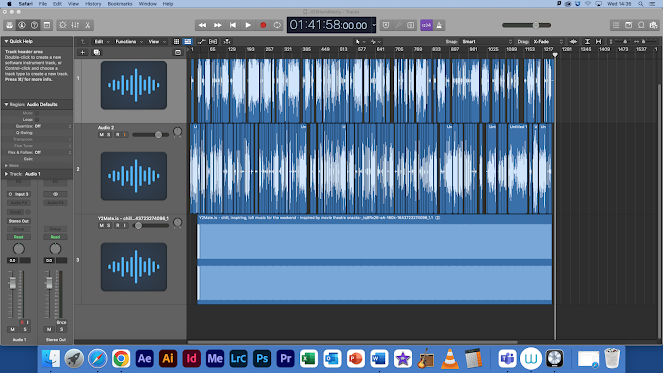
podcast post production Documentation

Image
  After the production process I began with the postproduction process by editing all of the footage of me and Matthew speaking to each other. I began by snipping out dead space in between one person talking and the other not I removed completely as to not have a necessary background noise the way I did this is by going into advanced tools on Logic Pro and activating them, after this I was able to select the snipping tool above the timeline of me and Matthew talking. To snip out portions of the audio I had to select the snipping tool out of all of the options then simply clicking where the beginning of the dead space (where the track has no audio) and the end of the dead space then simply clicking the backspace on the keyboard to remove the selected dead space in the audio.  Also at some points of the podcast sometimes we had spoken a little bit too loud having it peek on the microphones so in the editing process I went to the db and decreased it to something that would stop t...

Canon Pre-Production/Production/Post Production

Image
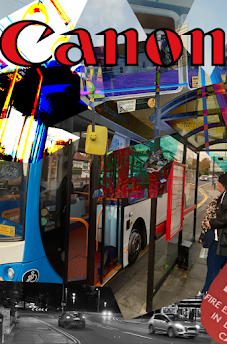
Pre Production Ideas and  Experimentation The image above are the first attempt at creating a canon advert for the journey campaign. The reason this advert looks very different to the final products is because I just wanted to experiment with Photoshop and its features before creating my poster. In my experimentation I used multiple layers and filter pre-sets for the first time. I also got used to using the lasso tool in Photoshop as I used it to cut out portions of the image and then applied a image behind that layer to clash both images together to get a cool effect. Production The images taken above were taken on an Iphone 11 which has a  dual-lens 12 MP rear camera  array as its camera and I took these images in the 1080p   resolution  and these images were considered for the final product but after trying to edit them they turned out not as good as they ended up looking odd and not like any i wanted for my advert but this is okay as they weren't the ones I...

Smile Campaign Advert Evaluation

Image
Smile Campaign Advert   Smile Campaign Advert Final Product - YouTube This video above is my final product of the smile campaign project. This version of the ad is improved over the draft which is also on the YouTube channel the final product is posted on. The differences include different colour grading, some transitions are changed to be more pleasing to watch and I also added an extra shot of me typing to split up a long scene and make the pacing overall better. Smile Campaign Ad Draft - YouTube The video above is the first draft of the smile campaign advert. This version of the advert is overall worse then the final product as there isn't any colour correction and also has some pacing problems as one shot goes on for to long in my opinion. Also in this draft the audio in the video can peak sometimes and makes for a not pleasant watch which is something I fixed in the final product. Pre Production In pre production I had planned many things that didn't make i...

Smile Campaign Draft Feedback

Image
  The first bit of feedback I got when people watched the first draft of the advert was from my classmate Madison. She said "while watching the advert only some of the transitions were strange as it transitioned from a white screen to a mostly back environment". In light of this I will be changing these transitions to a 'fade to black' then what i'm using right now which is just a fade then change in shot to the next. This transition would have been better to use if the colours didn't contrast so much from the two different shots. The second bit of criticism I got for my smile campaign advert was from my classmate Richard. He said "in the draft, the audio can peak at times and can sound to loud" I am going to be taking this advice on board and for the final product as I will turn down certain sounds and make the music not peak at any moments in the final product. https://youtu.be/zlSI2gkI1S8

Smile campaign post production diary

Image
  In postproduction I began by gathering all my clips onto premiere pro by using Google Drive as I had filmed all of my clips on my iphone 11. After this I used and MP3 downloader to download my song I would be using in the background of my advert which is heavenly father by Bon Iver. Once I began editing I used effects such as exponential fade which would help me gradually bring up the music at the beginning of the ad along with using the affect film dissolve which left me fade from black my beginning video clip. I believe this feed from black using the film dissolve is better than the video just starting with the clip unedited as it gives it more of a professional looking ad as it lets the viewer slowly into the ad along with the slow music. Whilst editing at some point in the edit having no diagenetic sound felt weird and A natural to watch so for the clips of me sitting down at my table you can hear my chair squeak and when I type on the keyboard you can hear the typing not lou...

Canon resource List

Image
  The list above is a resource list which is all of the resources I will end up using in poster for canons campaign Journey along with where these resources that I need can be acquired and if I have the resources at this moment in time (before production).

Canon Location Scouting

Image
 

Smile campaign production diary

Image
 During production everything has mostly gone well as I have been able to gather all of my needed shots apart from the few that I would’ve wanted did such as a pedestal up. All of the shots I have gathered are stationary shots which are great and I think some of the shots I’ve gathered are quite great cinematography wise as they fit the rule of thirds and are quite nice to look at as they have colours that pop out in the dark. A shot I have wanted to create which is a transitioning shot which will be a match cut Is is shot of me leaning back in my chair at the home setting and it will match cut to me leaning back in the chair at the college setting. This shot thanks to the help of one of my classmates was able to be achieved as they agreed to hold the camera on a dolly and truck left with the camera with me moving in the shot. In post production I believe this will be a great shot for the advert as it helps transition between both scenes effectively without being too confusing to t...

Smile Campaign checklist

  EGIONAL IDENTITY BRIEF  – PRE-PRODUCTION SELF ASSESSMENT     Your pre-production should look like a diary – separate tasks documented one after the other over a period of time to suggest you have worked systematically through tasks.     Make sure each post is clearly titled and each  p ost is labelled with the following:     ‘AC2: Problem Solving’, ‘AC4: Professional Practice’ ‘AC5 Communication’   Make sure you upload information to your blog using suitable methods.  PowerPoints, PDF’s etc should be uploaded to SlideShare and then embedded into your blog.     Have you completed your script in Master Scene Script format  ( CeltX ) ?     If you have multiple drafts please include these  (this could also be tagged under ‘AC1: Informing Ideas’ as it shows progression of an idea)    I have completed the the script for the smile campaign advert and the whole ad is based around that it's...